
Simple tutorial shows you how to recover whatsapp chat messages from iPhone backup step by step:
Step 1: Run Backuptrans iPhone WhatsApp Transfer on compuyer, turn to top tool bar and press "Import from iTunes" button or go File -> Import from iTunes.
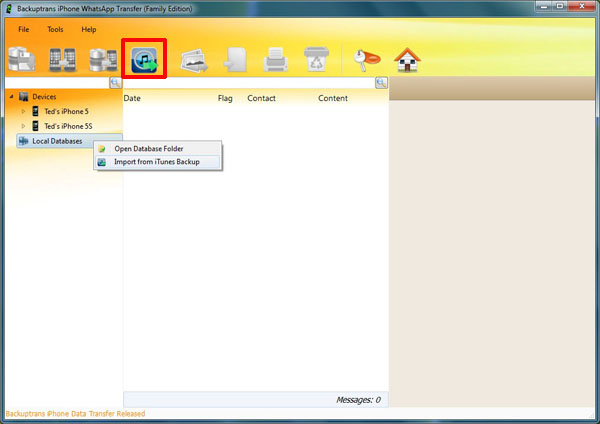
Step 2: Backuptrans iPhone WhatsApp Transfer will scan and detect all iTunes backup files on your computer automatically. Select your iPhone Backup on list and then click "Load" button to finish.
Note: If your iPhone backup is encrypted, please enter your password.
Step 3: Select a database to save chat messages. Or, simply enter a new database name to ceate a new database. Click Confirm to continue.
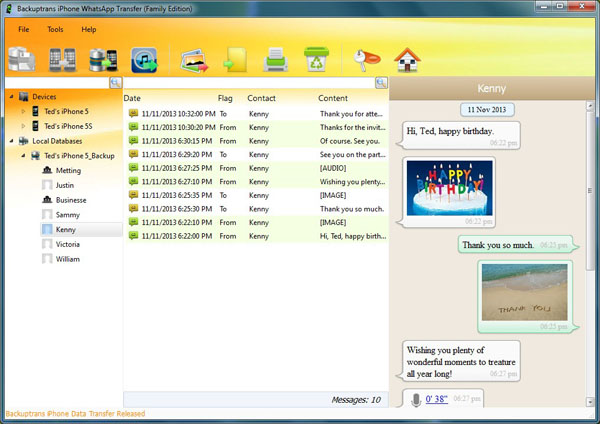
Step 4: After loading data from iPhone Backup. You can see all iPhone backup WhatsApp chat history including attachments on the software main interface. Now you can view the chat Messages which have been extracted from your iPhone Backup and check if your lost or deleted chat messages exists.
Step 5: Now please connect your iPhone to computer with USB cable and then restore WhatsApp chat messages from database to your iPhone by clicking the "Transfer Messages to iPhone" button. See the detail tutorial on how to restore whatsapp chat history to iPhone step by step.
Free download Backuptrans iPhone WhatsApp Transfer to try now.
If you are using Mac, please use Backuptrans iPhone WhatsApp Transfer for Mac instead.
Best luck!
Related:
 How to Backup WhatsApp Chat History from iPhone to Computer? How to Transfer WhatsApp Chat History between iPhones on Computer? How to Transfer WhatsApp Chat History from iPhone to Mac? How to recover deleted Messages from iPhone directly iPhone Backup Extractor - Recover iPhone Data from iTunes Backup
No comments:
Post a Comment