Tutorial on how to recover iPhone deleted data From iTunes backup on Mac step by step:
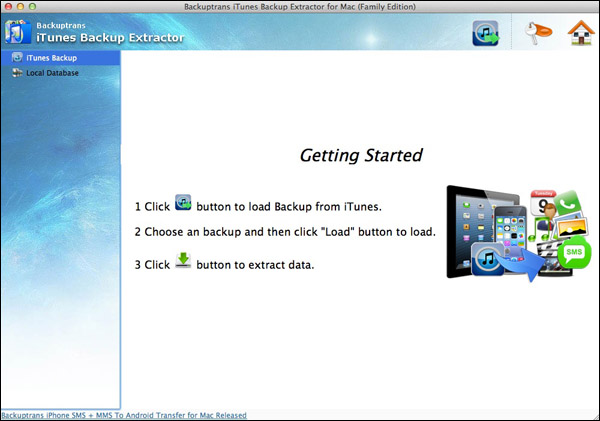
Step 1: Run Backuptrans iTunes Backup Extractor for Mac on your Mac computer. Then click the "Load iTunes Backup" button to load a backup from your Mac.
Step 2: Backuptrans iTunes Backup Extractor for Mac will detect all iTunes backup files on your Mac automatically. Select an iTunes Backup on list and then click "Load" button to finish.
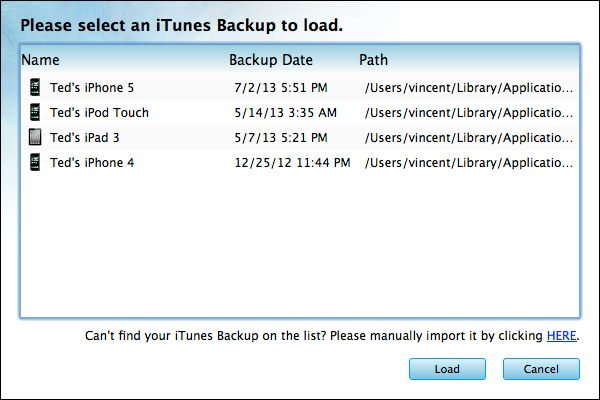
Note: If your iTunes backup is encrypted, please enter your password.
Step 3: Recover data from iPhone backup back to your iPhone by clicking the "Restore" button.
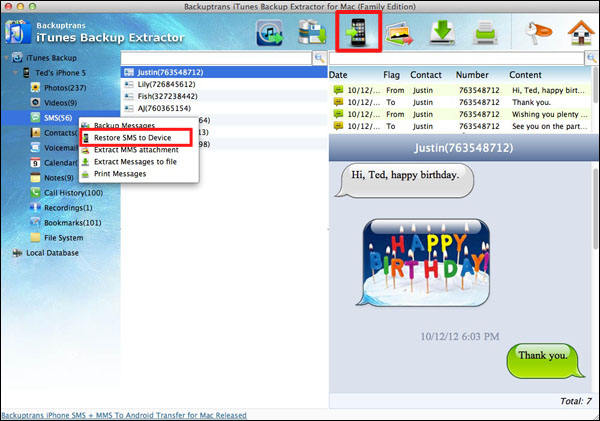
Step 4: Choose a device you want to restore data to. Click Confirm to continue.
Step 5: Done! All data have been restored and merged. You will find the data on your device after it restarted.
Recovering lost data for iPad and iPod Touch is also supported. Free download Backuptrans iTunes Backup Extractor for Mac to try now.
If you are using Windows, please download windows version iTunes Backup Extractor on your computer to use.
Best luck!
Related:
 How to extract & recover iPhone data from encrypted iTunes backup files? iPhone Backup Extractor - Recover iPhone Data from iTunes Backup
No comments:
Post a Comment