
The following article shows you how to recover iPhone deleted messages step by step:
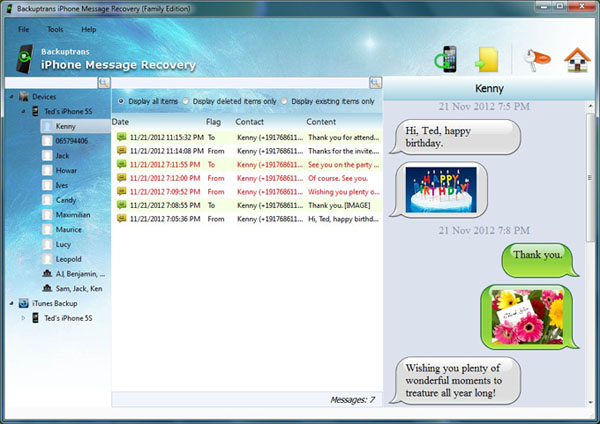
Step 1: Run Backuptrans iPhone Message Recovery on computer and connect your iPhone to computer using the USB cable. Then the software will automatically scan messages from iPhone and show details on its main interface. Your deleted messages will be displayed in red.
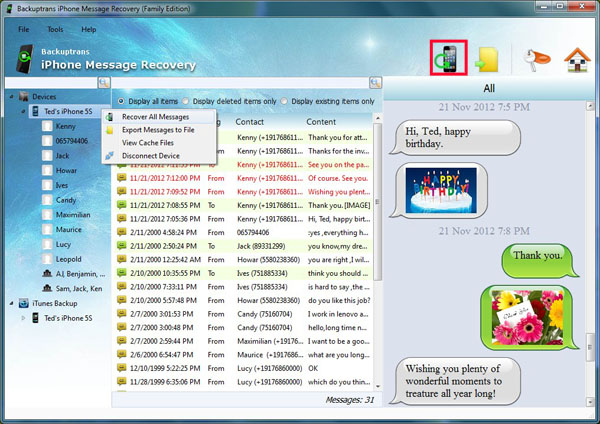
Step 2: Click the device title in the left Devices list and then turn to top toolbar and press "Recover to iPhone" button or go File -> Recover to iPhone.
Step 3: Select a target iPhone that you want to recover messages to. Click Confirm to continue.
Recovered successfully. After a few minutes, you will find your deleted messages have been recovered and restored perfectly on your Phone just like deletion hasn't happened before. Free download the software from your computer to try now.
If you are using Mac, please download iPhone Message Recovery for Mac to use.
Best luck!
Related:
 How to Recover SMS MMS iMessage from iTunes Backup? How to Recover iPhone Data from iTunes Backup? How to Recover WhatsApp Chat Messages from iPhone Backup? How to Backup iPhone SMS to Computer?

No comments:
Post a Comment