If you have synced your iPhone with iTunes on computer, Backuptrans iTunes Backup Extractor must be a good choice to help you recover iPhone Call history from iTunes Backup files. Unlike other iTunes recovery programs(that can only extract Call history from iTunes backup on computer), Backuptrans iTunes Backup Extractor supports Call history restore also. It provides an easy way to restore Call history from iTunes Backup back to your iPhone. Recovering Call history from iTunes Backup to a new iPhone is also supported.

The follow will show you how to Recover iPhone Call History from iTunes Backup step by step:
Step 1: Run Backuptrans iTunes Backup Extractor on computer. Then click the "Load iTunes Backup" button to load a backup on your computer.
Step 2: Backuptrans iTunes Backup Extractor will scan and detect all iTunes backup files on your computer automatically. Select your iPhone Backup on list and then click "Load" button to finish.
Step 3: After loading data from iTunes Backup. You can view the Call history which have been saved in your iTunes Backup and check if your lost or deleted Call history exists. If yes, Cheers!
Step 4: Connect your iPhone to computer. Choose Call History section and then click the "Restore To Device" button.
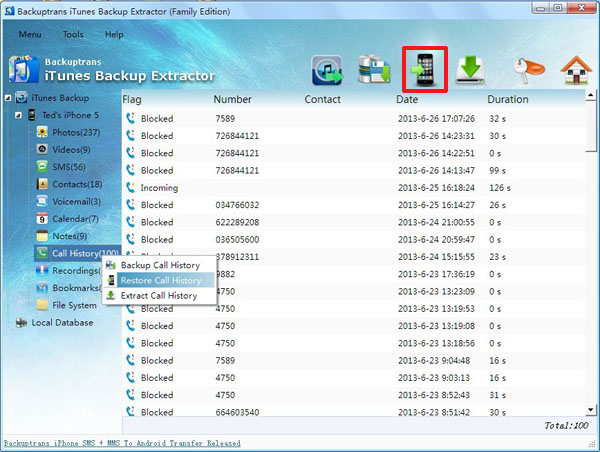
Step 5: Choose a device you want to restore Call history to. Click Confirm to continue.
Done! All Call history have been restored and merged. You will find them on your device after it restarted.
Free download Backuptrans iTunes Backup Extractor to try.
If you are using Mac, please use Backuptrans iTunes Backup Extractor for Mac instead.
Related:
How to Recover lost iPhone Photos from iTunes Backup?
How to Recover lost iPhone Videos from iTunes Backup?
How to Recover iPhone SMS Messages from iTunes Backup?
How to Recover deleted or lost iPhone Contacts from iTunes Backup?

No comments:
Post a Comment