Simple tutorial on how to extract and recover data with Backuptrans iTunes Backup Extractor:
1 Run Backuptrans iTunes Backup Extractor on computer. Then click the "Load iTunes Backup" button to load a backup on your computer.
2 Backuptrans iTunes Backup Extractor will detect all iTunes backup files on your computer automatically. Select an iTunes Backup on list and then click "Load" button to finish.
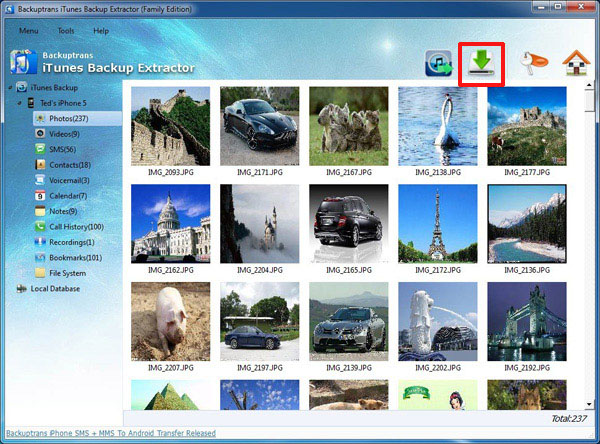
3-A Restore photos, videos, camera rolls etc media files
1) Click "Extract" button to extract and save the files from iTunes Backup to a folder on computer.
2) Connect your iPhone/iPad/iPod Touch to computer.
3) Launch iTunes to Sync photos, videos, camera rolls from computer to iPhone/iPad/iPod Touch.
3-B Restore SMS Messages, Contacts, Notes, Calendar events and Bookmarks
1) Connect your iPhone/iPad/iPod Touch to computer.
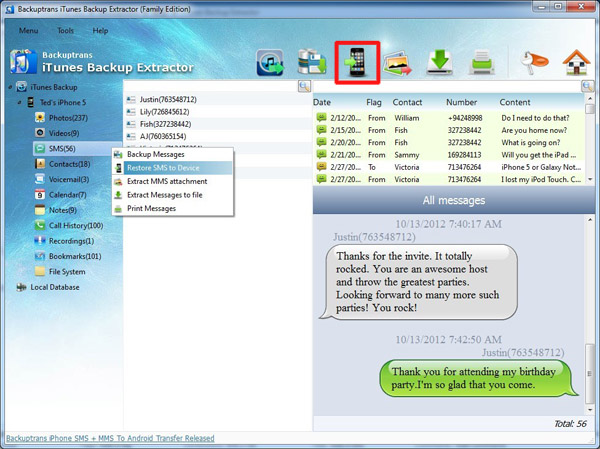
2) Choose SMS Messages, Contacts, Notes, Calendar events or Bookmarks section and then click the "Restore To Device" button.
Or you can right click the section and then choose "Restore to Device"
4 Done.
How fast and easy. Free download this iTunes Backup Extractor program to the try.
If you are using Mac, please download Backuptrans iTunes Backup Extractor for Mac on your Mac to use.
Best luck!

No comments:
Post a Comment